DZX STUDIO / AI FIELD GUIDE
From the first prompt
to a working Spectrum program.
What to ask. Where to ask it. What to check before accepting the answer.
Start with setupEIGHT PRACTICAL CHAPTERS
Choose the part you are working on.
Connect a model. Keep control of your project.
Configure the model roles, make a small first request and learn where your code goes.
Turn a game idea into a buildable brief.
Separate the rules, machine constraints and first playable milestone before generating code.
Improve BASIC one reviewed change at a time.
Add a behavior, preserve line references and distinguish a valid patch from a correct game.
Give Z80 a contract before asking for code.
Generate or improve a callable routine, inspect its memory use and test its return to the caller.
Design for pixels and colour cells, not a mockup.
Use AI for a concrete UDG or drawing routine, then judge the real Spectrum result in the native editors.
Compose in Music Studio. Ask AI to integrate it.
Use a precise note plan, edit the piano roll and connect reviewed music code to the game.
Show the failure. Ask for the smallest explanation.
Give the assistant reproducible inputs and current machine evidence, then test one hypothesis.
Audit the build before calling it finished.
Use AI to review a concrete release checklist while the IDE builds the actual distribution artifacts.
PICK THE RIGHT ENTRY POINT
Start beside the source.
- AI Assistant
- In the 1.7 workbench, open the right sidebar. Describe the change, press Send, expand the proposal and choose Apply Reviewed Changes only after inspection.
- Context details
- Review the project context before sending. The target and request counters stay visible beside the conversation.
- Source tools
- Command-K and the specialist BASIC/ASM actions provide source-focused entry points. Labels can differ in earlier builds.
- Complete application
- A separate, explicit project-generation option. Keep this experimental workflow separate from a small edit to existing code.
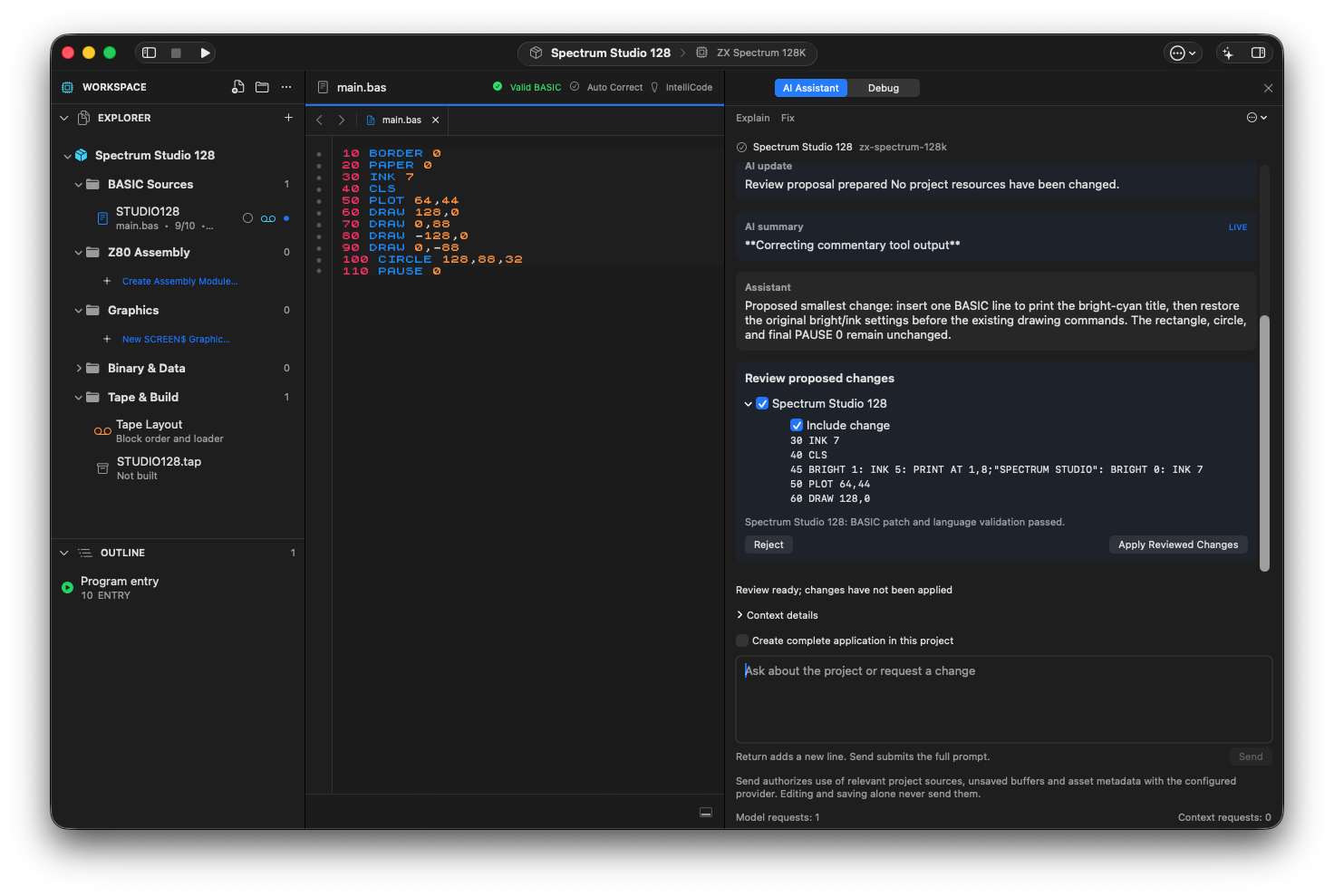
The project assistant proposes one BASIC line for a bright-cyan title. Local validation has passed; Apply Reviewed Changes is still a separate action.
Know what the assistant can see.
A selection is not a privacy boundary. Sending a project-assistant request authorizes relevant project sources, unsaved buffers and asset metadata to be sent to the configured provider; editing and saving alone do not send them. Inspect Context details and provide any missing runtime evidence yourself.
The BASIC example shows a reviewed source edit followed by an actual 128K run. It does not demonstrate automatic composition, pixel editing or a complete generated game. The music and graphics chapters use their native editors explicitly.
Read the AI data boundaries