WHERE IN THE IDE
BASIC editor → AI Assistant in the right sidebar; Command-K for source-focused assistance
Before you start
- Save a working program and create a Local History checkpoint.
- Choose one behavior to change, not a broad rewrite.
- Note the line numbers and variables whose meaning must be preserved.
The project assistant uses relevant project context, including unsaved source. Inspect Context details, name the file and block you mean, and describe the linked-source contract the change must preserve.
STEP 01
Mark the scope
Open the source that checks a guess and read its GO TO and GO SUB destinations. Open AI Assistant and name that file and block in your request. A selection or filename is a focus hint, not an isolation boundary: inspect every resource in the returned proposal.
STEP 02
Describe the before and after
Name the current behavior, the requested change and what must remain untouched. Adapt the names and line numbers in this example to your actual listing.
Target: ZX Spectrum 48K, authentic Sinclair BASIC.
Change only the guess-feedback behavior in the selected block.
After a wrong valid guess, show the attempts remaining. A correct guess must still reach the existing win routine.
Preserve replay behavior, current variable meanings and all unrelated lines. Do not renumber the whole program or add a new input method.
Return a minimal reviewable patch and explain every changed branch.
STEP 03
Review the exact hunks
Expand each resource under Review proposed changes. Compare the proposed lines with the original: unique line numbers, LET assignments, string/numeric variable use and changed branch targets. Check Include change deliberately and keep dependent changes together; an incomplete selection can break the control flow.
Local syntax and structure validation must succeed, but that does not prove the attempt count is logically correct.
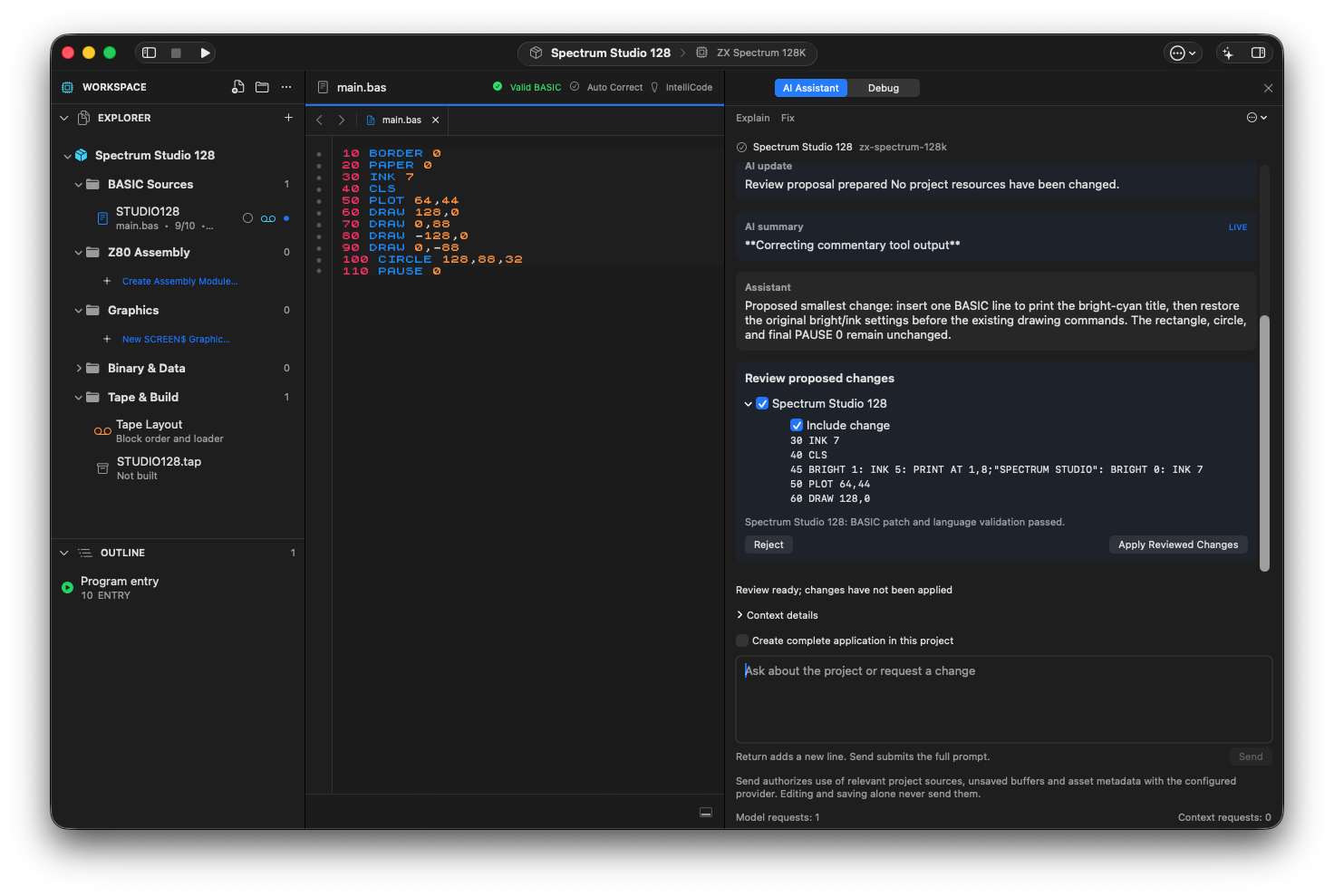
The project assistant proposes one BASIC line for a bright-cyan title. Local validation has passed; Apply Reviewed Changes is still a separate action.
STEP 04
Apply, then test the boundary
Choose Apply Reviewed Changes for the inspected proposal, then build and run. Try a first wrong guess, the last allowed guess and a correct guess on the last attempt. Compare the on-screen count with the actual guesses. If behavior regresses, undo the accepted edit and return with a concrete failure report.
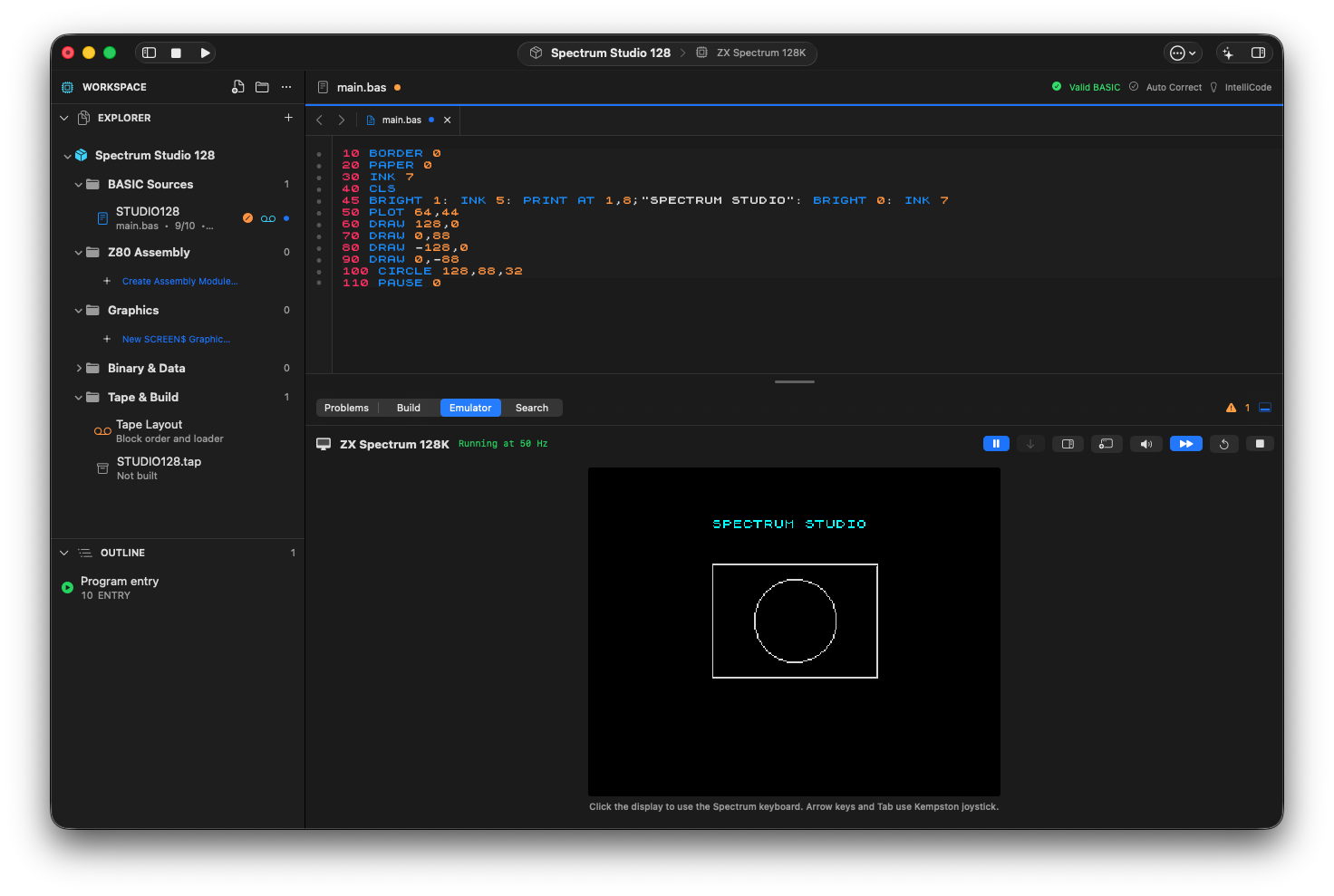
The approved title change running on the 128K target, with the original rectangle and circle preserved.
STEP 05
Use deterministic refactoring where it fits
For a purely mechanical renumber, variable rename or subroutine extraction, use the IDE’s Refactor tools and review their result. Ask AI to explain a control-flow choice or redesign behavior; do not request a full rewrite when a local refactoring already expresses the operation.
STEP 06
Ask for an explanation you can check
Once it works, select the changed block and ask for a branch-by-branch explanation. Compare the explanation to the actual code, not just the previous answer.
Explain only. Trace the current selected code for: first wrong guess, last wrong guess, correct last guess, then replay. Name the BASIC lines reached and variable changes. If a path depends on input handling outside the selection, say so. Do not claim you executed it.If something goes wrong
- Apply is blocked after you edited the source
- The proposal may be stale. Request a new patch against the current source rather than forcing an old change onto it.
- The model returns another BASIC dialect
- Repeat the Sinclair BASIC constraint and give the actual diagnostic. Reject WHILE/WEND or other constructs not supported by the target dialect.
- The patch compiles but the game is wrong
- Report the exact input sequence, expected message and observed message. Ask for one correction to that path.
READY TO MOVE ON?
Check the result, not just the response.
- Only the intended behavior changed.
- Line references and local validation are intact.
- The boundary cases work after a fresh build, and Undo remains available.