Core workflow
- 01
Write one numbered Sinclair BASIC line per physical line. A duplicate number replaces the stored line; a bare number deletes it.
- 02
Use Problems for syntax and semantic issues, then navigate directly to the affected source line.
- 03
Use Renumber, Rename Variable, Extract Subroutine or Delete Lines Safely instead of mechanical text replacement.
- 04
Build only after target-aware validation succeeds. Saving remains available throughout.
OPERATIONS & REFERENCE
Line numbers and replacement semantics
Use one numbered Sinclair BASIC line per physical source line. In Spectrum line-entry semantics, entering a number again replaces that line and entering a bare number deletes it. For a complete listing, keep line numbers unique and inspect diagnostics before building.
Completion and formatting
Use completion to insert Sinclair keywords and symbols, then Format Selection or Document to normalize supported formatting. Check the result around strings and embedded controls. Formatting does not repair program logic or convert another BASIC dialect into Sinclair BASIC.
Diagnostics and semantic rules
Open Problems, choose a diagnostic and inspect its source location. Fix syntax, unresolved references and structural errors before building. Saving remains possible. Read warnings separately from errors and check whether a strict build profile has promoted a warning.
Go to Definition and references
Place the caret on a line reference or symbol and use Navigate → Go to Definition or Find References. Confirm the destination belongs to the intended source, especially with linked BASIC routines. Use the Outline to inspect control-flow structure before changing branch destinations.
Renumber and rename
Use Refactor → Renumber Program or Rename Variable instead of blind text replacement. Review changed GO TO, GO SUB, RESTORE and RUN references. A dynamic computed destination may require your own reasoning; test the affected paths after the transformation.
Subroutine extraction
Select a coherent block and choose Extract Selection to Subroutine (Local). Inspect the new call, destination, RETURN and any variables the block uses. Do not extract a fragment whose branches still depend on entering or leaving the middle of the selected code.
Embedded Spectrum characters
Use the editor’s Spectrum character and control entry tools for graphics, UDG and inline colours. Toggle Embedded Control Source to inspect the source representation. Check that saving and reopening preserves the intended bytes rather than merely a visually similar Unicode character.
BAS, TAP and WAV import
Use Import ZX Spectrum Program for a listing or supported TAP, and Import WAV Recording for standard-speed tape audio. Review the recovered listing before confirming replacement of non-empty source. Turbo loaders and arbitrary damaged pulse streams are not a supported recovery promise.
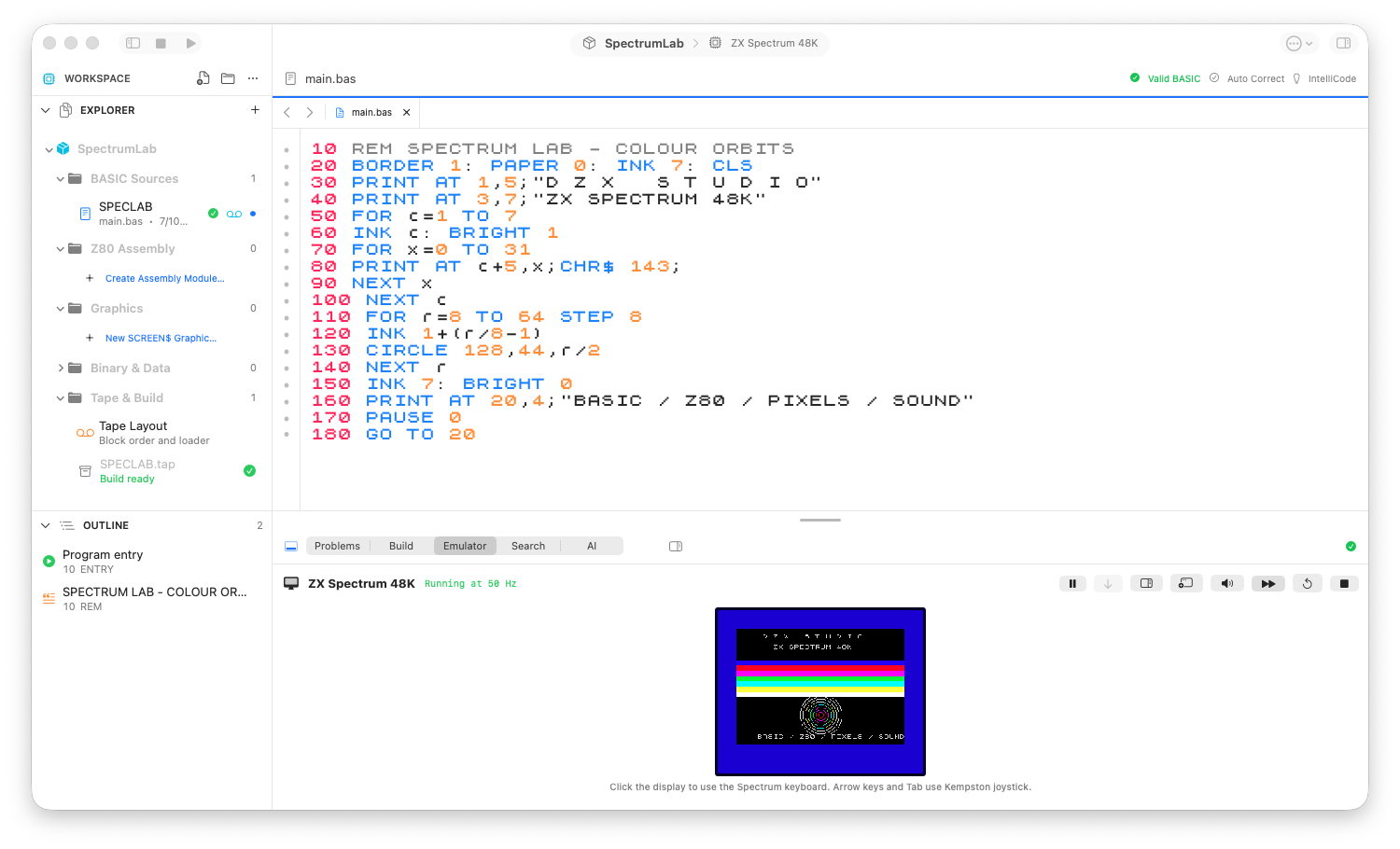
The 48K workbench: project navigator, syntax-aware source and the running program.
Review checks
Every physical line has a unique number from 1 to 9999.
Literal GO TO, GO SUB, RESTORE and RUN targets still resolve after refactoring.
Embedded colours, mosaics and UDG characters round-trip to byte-exact source notation.
Boundaries
Sinclair BASIC differs from Microsoft and Commodore dialects.
Warnings may describe risky but encodable behavior; errors block TAP generation.