WHERE IN THE IDE
AI Settings / Configure AI Models → AI Assistant in the workbench sidebar
Before you start
- Use a disposable project with no credentials or private customer code.
- Save the project and confirm its 48K or 128K target.
- Have an account/API key for your chosen provider, or a running supported local service.
The project assistant can send relevant project sources, unsaved buffers and asset metadata. Inspect Context details before Send. A source selection is a focus hint, not a boundary around the data sent.
STEP 01
Choose the connection you actually have
Open Configure AI Models. OpenAI, Anthropic and OpenRouter use their provider credentials. Ollama and a compatible Unsloth service require a reachable local endpoint. The Codex integration uses its configured external runtime and account session. A ChatGPT subscription and a provider API credential are different access methods; configure the method you intend to use.
STEP 02
Assign the model roles
Set Copilot / Corrector for short edits, explanations and fixes; set Generator for complete programs or modules. The Game Project Agent has a separate model selection. Use model identifiers available to your account, save the configuration, and keep this first test small. The guide does not depend on a particular model name or paid plan.
STEP 03
Give the assistant a harmless source
Open a BASIC source containing the small listing below. Open AI Assistant in the toolbar, enter the request and press Send. Return inserts a new line in this composer. Ask for an explanation without a code change; older builds also offer Ask AI through Command-K.
Explain only; do not propose a patch.
Target: ZX Spectrum 48K.
In this program, explain why line 20 waits for a key and what happens next.

10 PRINT "HELLO"
20 PAUSE 0
30 STOP
An explanation should describe the wait at PAUSE 0. Advice alone should not require applying an empty patch.
STEP 04
Try one reversible edit
Ask to change only the greeting to HELLO SPECTRUM. Expand the resource under Review proposed changes and inspect the code. Leave Include change checked only for the intended edit, then choose Apply Reviewed Changes. Use Command-Z and verify that the original greeting returns before continuing.
Review ready means the proposal is available, not that the source has changed. Apply and Undo are separate actions.
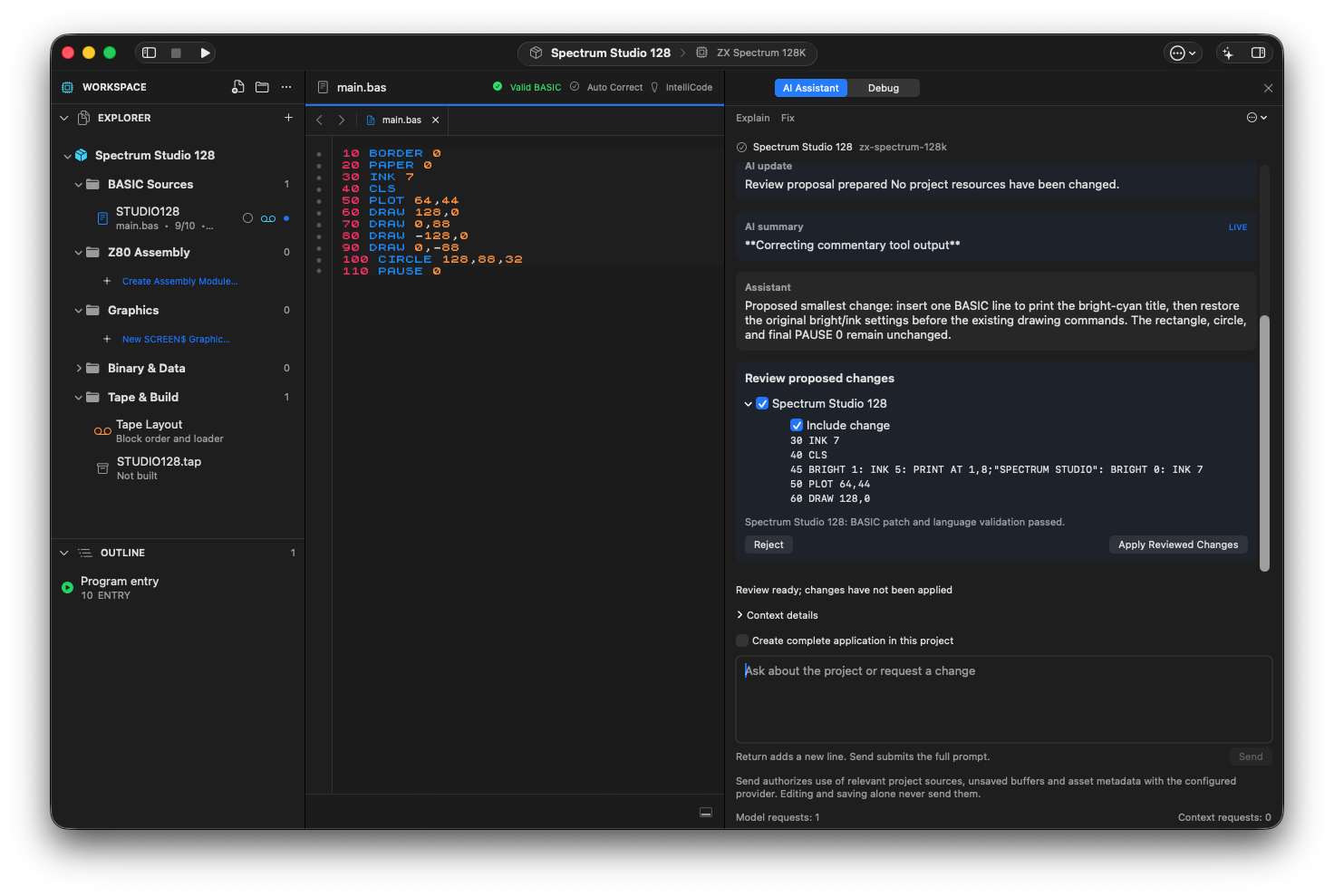
The project assistant proposes one BASIC line for a bright-cyan title. Local validation has passed; Apply Reviewed Changes is still a separate action.
STEP 05
Understand the privacy boundary
Your API keys are stored locally in macOS Keychain, not inside the project package. Remote providers receive the submitted context and have their own retention and account policies. A local launcher can still contact a remote service; check the actual endpoint and runtime configuration. Rejecting a proposal does not retract a request already sent.
If something goes wrong
- Authentication or model-not-found error
- Check the provider, credential and exact model identifier together. Do not paste the key into a prompt or a support screenshot.
- A local model does not answer
- Check that the service is running and the endpoint matches the configured service. Do not switch to a remote endpoint without reviewing the data boundary.
- The answer is correct but there is no Apply action
- An explanation can be advice-only. Ask explicitly for a source change when you need a patch.
READY TO MOVE ON?
Check the result, not just the response.
- A small request returns successfully.
- You can identify the provider and model role being used.
- You have reviewed, accepted and undone one harmless change.