Core workflow
- 01
Run project preflight and resolve missing, duplicate or stale artifacts.
- 02
Arrange loader, SCREEN$, CODE and BASIC in Tape Layout.
- 03
Review generated loader changes, especially physical 128K bank placement.
- 04
Build, inspect sizes and export TAP, WAV or a distribution archive from the immutable result.
OPERATIONS & REFERENCE
Build graph and freshness
Build Project validates source and artifact dependencies before producing the tape. If output is stale, regenerate it in the owning editor and review it again. Keep the output fingerprint tied to the project state you tested; saving source and producing distributable output are different operations.
Tape Layout Editor
Open TAP → Tape Layout Editor. Arrange the actual loader, screen, CODE and BASIC blocks in the order the program will load them. Check names, lengths and load addresses. A resource saved in the project library is not necessarily a block on the tape.
Smart loader dependencies
Read each generated LOAD alongside its expected later block. A screen or CODE block placed before the loader requests it can break the loading sequence. Apply a generated loader only after reviewing the text; preserve a known-good loader before experimenting.
128K banked loader review
With banked CODE selected, open the banked loader review. Inspect physical banks, window addresses, block order and the final paging/call state. Apply it explicitly and build again. Loader generation is not permission to silently change the project’s machine or module placement.
Generate and inspect TAP
Build from the saved current project, resolve preflight errors and inspect the resulting blocks. Verify the BASIC/CODE names, sizes, addresses and checksums before export. Run the generated candidate; the presence of a .tap file alone does not prove the game works.
Export WAV
Use Export WAV As on a valid current build to produce standard ROM-speed audio. Test the intended playback/loading path at suitable settings. Integrated instant loading is not an analogue audio test, and this export does not promise support for turbo or custom loaders.
Distribution archives
Export Generated TAP for players, and Export Project Archive when the editable project is needed. Reopen a copy of the archive to check source and asset portability. Include controls and the target machine in release notes; do not package provider credentials with the project.
Sinclair listing PDF
Choose Export Sinclair Listing PDF to create a readable source listing. Check the selected source, line numbers and embedded characters in the result. A PDF is useful for reference and printing; it is not an executable tape or a substitute for an editable project backup.
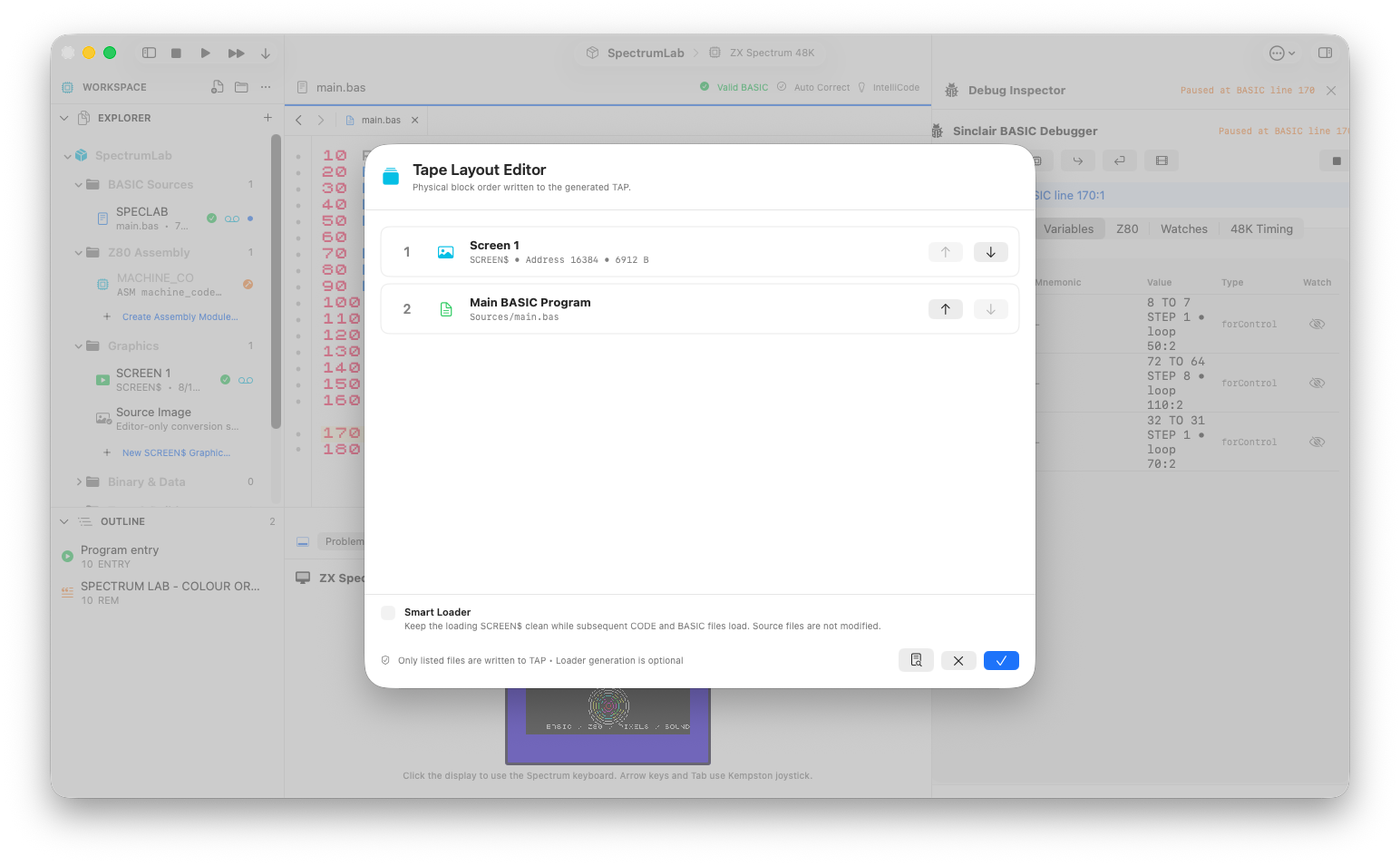
A 6912-byte loading SCREEN$ followed by the BASIC program in the Tape Layout Editor.
Review checks
Every LOAD has a corresponding later block with the right type, name, size and address.
Header and data checksums are valid.
The output fingerprint matches the current project state.
Boundaries
Successful integrated execution is not proof of analogue tape reliability.
WAV export is standard ROM timing; turbo and custom pulse recovery are outside scope.